
AI Writing Etiquette Manifesto

We are in the Wild West of AI writing.
Everyone is using AI to move faster. Yet workplace norms are still blurry. We have tools, prompts, and output but very little shared etiquette.
Should you use AI to help write:
- the team's weekly motivational message in Slack?
- your LinkedIn post?
- feedback to a teammate after a rough project?
According to Fortune, AI's favorability rating is 26%. That alone should make us think twice before using AI to write communication that shapes how other people perceive us.
How we use AI in the workplace matters more than most people realize. Words carry emotion. AI-written words do too. Is the emotion these words convey helping or damaging you, your team, and your business?
And with 28% of workers using AI frequently at work, internal AI slop is becoming a serious problem. I've seen it firsthand. We need a clearer set of norms for how AI should and shouldn't be used in workplace writing.
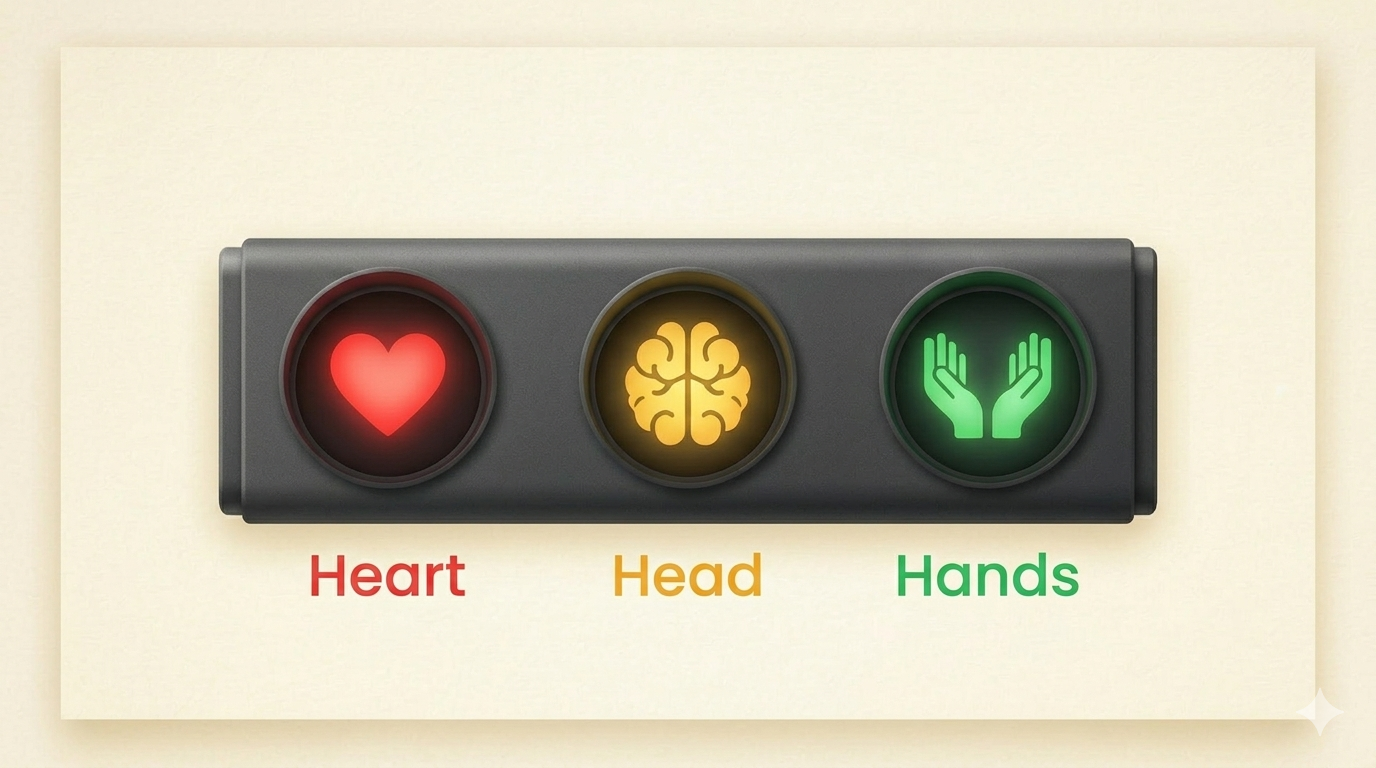
This manifesto is my attempt to set those norms. First, I outline the ways in which we use AI at work to assist with writing. Then, I'll introduce a new framework for deciding when AI belongs in the process: heart, head, or hands.
How To Decide When To Use AI: The Heart, Head, And Hands Framework
The question to ask is:
Would this person be upset if they found out you used AI to draft this writing?
If the answer is yes!, then it belongs in the heart category. If the answer is a maybe, then it's the head. If the answer is no, it belongs in the hands.
Let's break it down further.
The Heart: You are trying to make an emotional connection with the reader. Treat this as a red light 🚨 for AI.
The Head: The message is partly informational, but trust, judgment, or personal perspective still matter. The other person may care if AI shaped it too much. You may be trying to motivate, build trust, or lead. This is a yellow light ⚠️. Use AI carefully.
The Hands: When the recipient doesn't care if you're using AI. The information is the deliverable, not the relationship. This is operational writing where efficiency matters more than authorship, such as a weekly recap built from spreadsheet data. This is a green light 🟢 for AI.
The heart and hands are fairly straightforward.
Most people intuitively understand the heart category. Few would want AI drafting something like a layoff message. The emotional stakes are too high. At most, AI can offer light feedback that you apply manually.
The head is where things get interesting. There is a lot of "it depends" here. This is where prompting, context building, editing skills, and a solid understanding of AI writing patterns and tells really matter.
My work and recommendations sit in the "head" area. You're using AI somewhere in the process, but you don't want it taking over. Overdo it, and you risk sounding incompetent or triggering a negative reaction in your reader.
Let’s look at examples to make the framework more concrete. The heart and hands are usually easier to spot. The head gets more nuanced, so those examples need a bit more explanation.
Heart (Red): Write it yourself. AI stays out or only gives feedback you apply manually.
- Announcing layoffs or role eliminations
- Delivering difficult performance feedback
- Writing a personal birthday or congratulations message
- Motivating the team after a rough quarter
- Welcoming and introducing a new team member
- Announcing a death or loss on the team
- Apologizing for a mistake to a client, teammate, or your team
- Announcing someone's promotion
- Responding to someone who shared personal news (illness, family situation)
- Writing a farewell message to someone leaving the company
- Thanking someone who went above and beyond on something specific
- Addressing team tension or conflict directly
- Writing a personal recommendation or reference
- Delivering bad news to a client about a major failure your team caused
- A CEO or leader's message about company direction during uncertainty
Head (Yellow): AI can help, but your thinking and voice need to come through. Edit heavily.
- Sharing a project retrospective with the team - what went well, what didn't, your honest read on why. AI can help you structure it but if your actual observations aren't in there, it's just filler.
- Introducing yourself to a new client or stakeholder - not a templated email. They're forming an impression of you. AI can help you organize your thoughts but the way you describe your work should sound like you.
- Responding to a thoughtful question from a teammate - they put thought into asking. A polished AI response feels dismissive even if the content is correct.
- Writing a follow-up after a networking event or conference - "Great meeting you" emails are a dime a dozen. If yours reads like every other AI follow-up, you've wasted the connection.
- Pitching an idea to leadership - your conviction and reasoning matter. AI can help you structure the argument but if it rewrites your directness into corporate hedging, you've lost the pitch.
- Reaching out to someone you haven't talked to in months - the whole point is that you thought of them. If it reads like a template, it defeats the purpose.
- Giving constructive feedback on someone's deliverable - not a performance review (that's red), but "hey, here's what I think about this draft." Your specific, honest reaction matters.
- Writing a LinkedIn post about something you learned - your voice and perspective are the product. AI can help you tighten it or create a loose framework but shouldn't write it.
- Responding to a client asking why you recommend a particular approach - they want your reasoning, not a textbook answer. If it sounds like a Google search result, trust erodes.
- Sending a proposal or scope of work that isn't templated - especially early in a relationship where they're evaluating you as much as the work.
- Sharing your perspective on a strategic decision in a Slack thread - people are debating, you're weighing in. If your take sounds like an AI-generated balanced summary, you haven't actually weighed in.
- Emailing a mentor or someone senior you respect - low frequency, high relationship value. Every word matters more because you don't talk often.
- A team lead's weekly reflection that goes beyond status updates - when you're not just listing what happened but sharing what you think it means.
Hands (Green): AI can do the heavy lifting. Light editing for accuracy.
- Weekly or daily status updates in Slack
- Summarizing meeting notes
- Documenting a process or SOP
- Writing step-by-step instructions for a tool or workflow
- Formatting raw data or analytics into a readable update
- Creating an agenda for a recurring meeting
- Writing a bug report or issue ticket
- Compiling research into a summary
- Drafting a FAQ document
- Reformatting messy notes into something structured
- Creating a project timeline or milestone summary
- Writing a handoff document when transitioning work
- Daily standup updates
- Internal knowledge base articles
- Templated client updates that go out regularly with new data
The framework above helps you decide when to use AI. The next step is deciding how involved AI should be once it is in the process.
How We Use AI To Assist With Writing
Here are six common AI-assisted writing workflows, ordered from least likely to sound like AI to most likely:
- You wrote it entirely yourself.
- You wrote it, AI gave feedback, then you made the edits yourself.
- You gave AI your ideas, it helped with structure and direction, and you did the writing.
- You wrote the draft and let AI edit the wording directly.
- You gave AI your ideas and reasoning, it drafted the piece, and you edited it.
- An automated workflow pulls in data or research, generates a draft, and you edit the result.
In the examples above, “editing” assumes a relatively light pass.
If keeping your voice matters, use AI for feedback or structure, then make the final wording decisions yourself.
Once AI starts writing for you, you risk falling into its patterns. The output may be polished, clear, and technically “good,” yet still feel too smooth to seem fully yours.
The framework above covers when to use AI. But how you use it matters too. Here are some things I've learned (sometimes the hard way).
What Nobody Tells You About Using AI to Write
Teammates who are skeptical of AI
Spend a little time around pro-AI content online and you quickly see how much resistance and resentment AI can trigger. The reasons vary, and many are personal.
Be kind and patient with your anti-AI teammates. Avoid flooding them with low-quality AI output, and be mindful of how both AI writing and visible productivity gains may land with them emotionally.
AI softening your tone
If you use AI to edit or draft for you, watch for tone softening. Most models default to agreeable, polished language unless you deliberately protect your natural voice.
For example, if you write "This didn't work and here's why..."
With AI it might come out as: "While there were some challenges, there are also opportunities for growth..."
Stick with the original direct and brief tone.
Using AI to inflate weak thinking
AI is great at using a lot of words to say something that has little substance. That is one of the main sources of slop: a lot of words saying very little.
An example of this is using AI to fill out a document when you have little to say. For example, a weak weekly update can suddenly become several polished paragraphs without becoming any more useful.
Another example is an SME filling out a document that the marketing team will use for copy. I've experienced this firsthand. The information mostly comes straight out of the LLM: bland, boring, and basic.
Case studies also suffer here. The best ones include specific details, real tension, and actual lessons learned. If you give it very little solid information, AI inflates it with hollow filler.
Before you hit send...
Ask yourself: would this person care if they knew AI wrote this?
Aim to be the person on the team who 3x’s their output while minimizing the slop.
AI writing etiquette matters because writing is emotional. At work, it does more than transfer info. It shapes how people experience you.
Used well, AI can increase output and creativity while also saving time. Used poorly, it weakens relationships and your impact.
-----
Also, I want to hear from you:
Do you agree with this framework?
Have you developed your own rules for using AI at work?
Do you have any teammates who are using AI poorly, and making things worse?
- Blake 🖋️ 🤖